


Walk into almost any busy retail store on a Saturday afternoon and you will see it. A line of customers waiting at the customer service counter, tapping their phones, checking the time, watching one associate try to juggle a return, pickup order, and a price check all at once. This is the part of retail that nobody talks about in the big strategy meetings, but it is the part that quietly drains customer patience and staff energy every single day.
BOPIS and click-and-collect were supposed to fix the friction of online shopping. In a lot of ways, they did. But they also created a new bottleneck. Instead of waiting for a delivery truck, customers now wait in a store line behind a counter that was never designed to handle this volume of pickups and returns. Smart lockers are quietly becoming the fix retailers needed, and the ones who have adopted them are seeing real, measurable change in how their stores operate. This guide breaks down what BOPIS actually means, how lockers fit into the bigger omnichannel retail fulfillment picture, what a real implementation looks like step by step, and which numbers actually prove whether the investment is working.
What is BOPIS and how do smart lockers support it?
BOPIS stands for buy online pickup in store. A customer orders something on a retailer’s website or app, and instead of waiting for shipping, they head to the nearest store to grab it the same day. It is one of the fastest growing parts of omnichannel retail fulfillment because it gives shoppers the convenience of online browsing with the immediacy of in person pickup.
The problem is that most stores still handle BOPIS in the old-fashioned way. An associate pulls the order, holds it behind a counter, and waits for the customer to show up and ask for it by name or order number. When several orders are ready at once, or when the front counter is also handling returns and regular checkout, things slow down fast. Customers end up standing around longer than they expected, and some give up entirely. That is where BOPIS abandonment rate becomes a real metric retailers have to watch, because a clunky pickup experience can undo all the convenience that made BOPIS appealing in the first place.
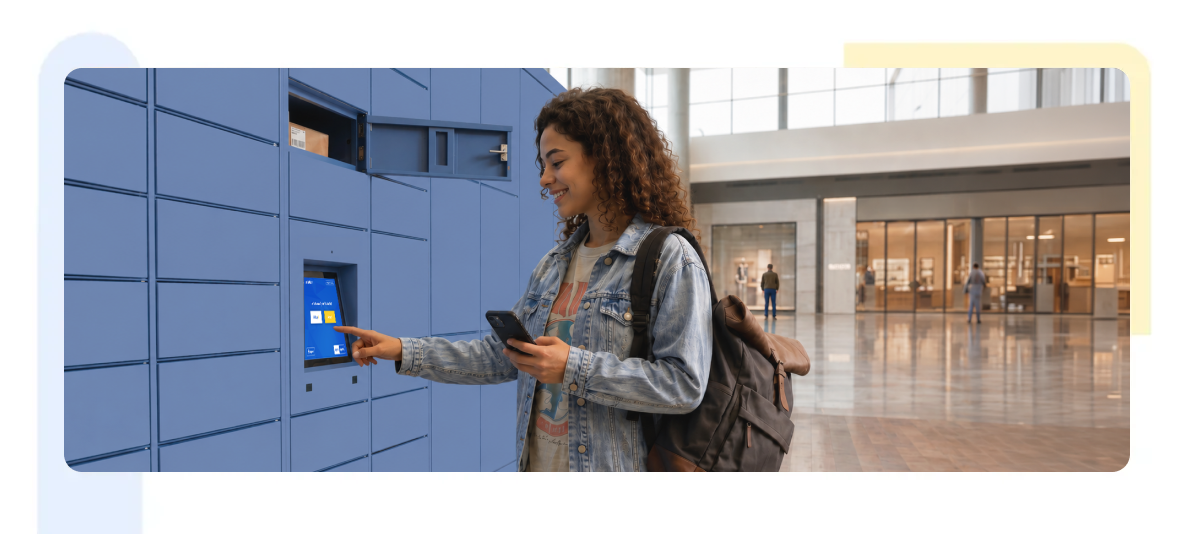
Smart lockers change this completely. Once an order is ready, staff place it inside a locker bay instead of behind the counter. The customer gets a notification with a code or QR scan, walks up to the locker wall, taps in their code, and the right door pops open. No searching, no waiting in line, no asking an associate to dig through a stack of bags. The whole interaction takes about a minute.
This kind of self-service fulfillment does more than save time. It gives customers a sense of control over their own pickup, which tends to translate into higher satisfaction scores. It also frees staff from babysitting a pickup counter, so they can focus on customers who actually need help on the sales floor. For after-hours pickup, lockers are especially valuable since they let customers grab their order even when the store is closed, as long as the locker bank is in an accessible vestibule or near the entrance.
How smart lockers handle returns
Returns get the same treatment as pickups. Instead of a customer needing to interact with a staff member to process a return, many smart locker systems allow drop-off returns directly into a locker. The system logs the item, sometimes scans a barcode, and the retailer processes the actual refund or exchange on the back end without the customer needing to stand around waiting. This single feature alone has been a big driver of smart locker ROI in retail, since returns are typically one of the most labor-heavy parts of in-store operations.
There is also a security angle that often gets overlooked. Packages waiting in an open area behind a counter, or worse, on an unattended shelf, are vulnerable to mix-ups or even theft. Locker systems with individual locked compartments solve this. Package theft prevention in retail becomes less of a manual vigilance problem and more of a built-in feature of the hardware itself.
Smart locker implementation checklist for retailers
Rolling out smart lockers is not just about buying hardware and bolting it to a wall near the entrance. Retailers who get the most value out of these systems tend to follow a similar set of steps before going live.
Step 1: Map your order volume and traffic patterns
Start by mapping your actual order volume and traffic patterns. A flagship store with hundreds of daily BOPIS orders needs a different locker configuration than a smaller suburban location. Look at peak hours, average order size, and how many of your orders are pickup versus delivery. This data shapes how many locker units you need and what size compartments make sense.
Step 2: Choose the right placement
Decide on placement early. Most retailers put locker banks near the entrance or in a dedicated vestibule, so customers do not have to walk deep into the store. This also supports after-hours pickup, since the locker can sit in a space accessible without unlocking the whole building. Avoid placing lockers somewhere that creates new bottlenecks, like a narrow aisle or near another high traffic fixture.
Step 3: Plan the system integration
This is where many implementations stumble if it is rushed. Your smart locker software needs to talk to your existing point of sale and inventory systems. The locker system has to know in real time when an order is packed and ready, has to issue secure codes for both pickups and returns, and has to update inventory or refund status without a manual handoff. Test this integration thoroughly before any customer ever touches the locker.
Step 4: Train staff on the new workflow
Train staff on the new workflow early. Even though lockers are designed to reduce staff involvement, employees still need to know how to load orders, troubleshoot a locker that will not open, and handle edge cases like a customer who lost their pickup code. A locker rollout that skips staff training tends to create more confusion in the first few weeks than it solves.
Step 5: Run a pilot before full rollout
Pilot with a single location or a small cluster of stores before a full rollout. This lets you catch issues with locker sizing, software integration, or customer confusion on a smaller scale. Use this pilot phase to gather real usage data and customer feedback before committing budget to a chainwide expansion.
Step 6: Communicate the change to customers
Update your app, website, and order confirmation emails to clearly explain how locker pickup works. A customer who shows up expecting a counter handoff and instead finds a wall of lockers needs clear signage and simple instructions, or the new system will feel more confusing than convenient.
BOPIS KPIs: what to measure and why
None of these matters if you are not tracking whether the lockers are actually working. The right KPIs tell you if the investment is paying off and where to make adjustments.
Pickup time
This is the most obvious one. Measure how long it takes from the moment a customer arrives at the store to the moment they have their item in hand. Retailers consistently see this number drop once lockers replace a manual counter handoff, sometimes from several minutes down to under sixty seconds.
Failed pickups
This is the rate of orders that go unclaimed or where the customer cannot complete the pickup for some reason, whether that is a lost code, an order that was never loaded, or a system glitch. A high failed pickup rate points to either a training gap or a software integration issue that needs fixing.
Locker utilization rate
This tells you whether you have the right number of units for your volume. If lockers sit empty most of the day, you may have oversized your installation. If certain time slots show every locker full, you may need additional capacity, especially around peak hours like weekends or holiday shopping windows.
Staff hours reallocated
This KPI often gets skipped but matters a lot to operations leaders. Track how many hours per week staff used to spend pickup and return handling before lockers, compared to after. This number directly supports the business case for staff workload reduction and can be used to justify locker expansion to other locations.
BOPIS abandonment rate
Worth tracking before and after locker implementation. If fewer customers are bailing on their pickup order, that is a direct sign that the locker experience is smoother than the old counter process.
Customer satisfaction
Whether through post pickup surveys, app reviews, or simple feedback forms, this is the metric that ties everything together. Faster pickup time and fewer failed pickups should show higher satisfaction scores if the rollout was done right.
Curbside vs locker pickup
Curbside requires staff to walk orders out to a car, which still ties labor and depends on weather and parking availability. Lockers remove the weather dependency, and the staff walk time entirely, which is part of why many retailers are shifting more of their BOPIS volume toward lockers over time. If your store currently offers both, comparing pickup time and staff hours across the two channels is one of the clearest ways to see which one is actually serving customers better.
Where this is headed
Retail fulfillment is not going to stop changing, and the stores that treat pickup and returns as an afterthought are the ones that will keep losing customers to friction they could have avoided. Smart lockers are not flashy gimmicks. They are a practical answer to a problem that has been quietly costing retailers time, labor, and customer goodwill for years. Stores that get the implementation right are already seeing it show up in their numbers, and the gap between those stores and the ones still relying on a single overworked counter associate is only going to grow.