


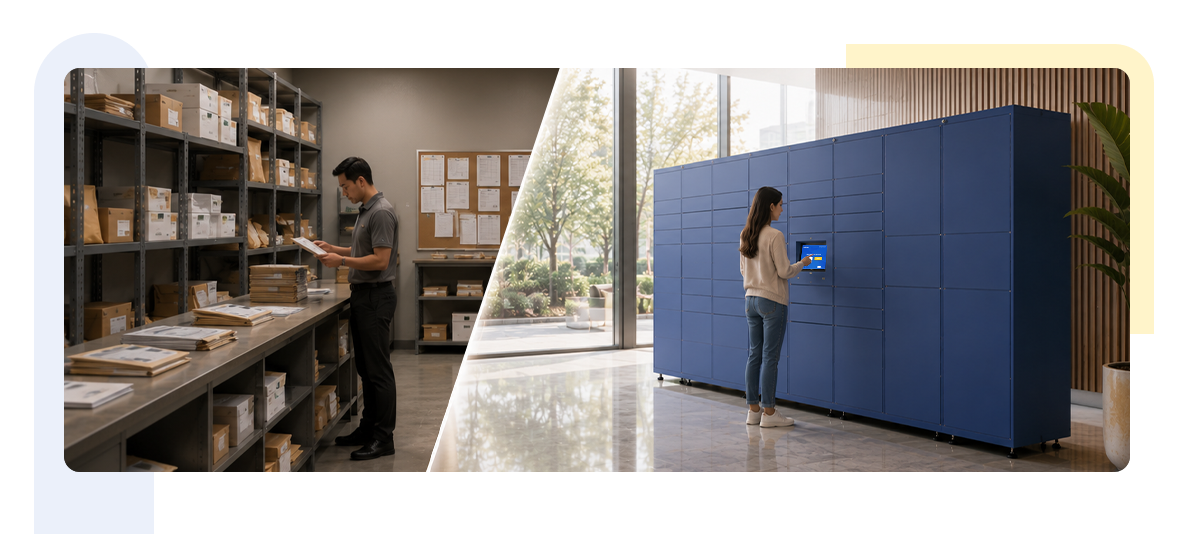

Walk into almost any corporate office, residential high-rise, or logistics hub these days, and you’ll spot the same pile up near the front desk. Boxes stacked three high. A sign-in sheet nobody bothers to fill out properly. Someone from facilities trying to remember which package belongs to which floor.
Sound familiar?
For decades, the traditional mailroom did its job well enough. But package volumes have exploded, work patterns have changed, and the old model is starting to show its cracks. So the question facility managers and operations heads keep asking is simple: do smart lockers actually save money compared to running a traditional mailroom, or is this just another shiny piece of office tech that sounds good on paper?
Let’s dig into the real numbers, the hidden costs nobody talks about, and where the smarter investment actually lies.
Why Traditional Mailrooms Worked for Years
There was a time when this setup made complete sense. Offices received a modest, predictable number of parcels each day. One or two staff members could log packages by hand, store them in a back room, and notify recipients with a phone call or an email.
It was simple. It didn’t need technology. And frankly, it worked because the volume was manageable.
Think about what a typical mailroom looked like fifteen years ago. A handful of deliveries a day. Maybe a courier drop twice a week. A dedicated person whose entire job revolved around receiving, logging, and distributing mail.
That system was built for a different era of work.
What Has Changed in Today’s Workplaces
Now think about how many packages arrive at your office every single day. E-commerce alone has changed delivery patterns completely. Add hybrid work schedules, vendor deliveries, IT equipment shipments, and personal parcels employees now route to their workplace instead of home, and you get a very different picture.
Now imagine your receptionist is unavailable, out sick, or handling three other tasks at once. What happens to the thirty packages sitting behind the desk?
What happens when employees work hybrid schedules and only come into the office two or three days a week? Does that parcel sit there for four days, taking up space and creating uncertainty about whether it will go missing?
Would adding another employee solve the problem, or would it simply increase your operating costs without actually fixing the root issue?
This is exactly where the traditional mailroom model starts to strain. It wasn’t designed for this volume, this pace, or this kind of flexible work culture.
Understanding the True Cost of a Traditional Mailroom
When facility teams evaluate traditional mailroom cost, they usually calculate salaries and maybe some shelving. But that’s only a fraction of the real number.
Here’s what actually goes into running a manual mailroom:
- Salaries for one or more dedicated mailroom staff
- Overtime during high volume periods like festivals or year-end shipments
- Physical space allocated for storage shelves and sorting areas
- Manual logging systems, whether paper registers or basic spreadsheets
- Communication overhead, since every delivery needs a phone call, email, or physical notification
- Liability costs when packages go missing or get damaged
When you add these up across a year, the traditional mailroom cost often surprises people. It’s rarely just “the cost of a mail clerk.” It’s the cost of space, time, admin overhead, and risk combined.
Hidden Costs Most Organizations Overlook
This is where things get interesting. Beyond the obvious staffing expense, there’s a layer of hidden costs that rarely shows up in a budget line item but absolutely affects your bottom line.
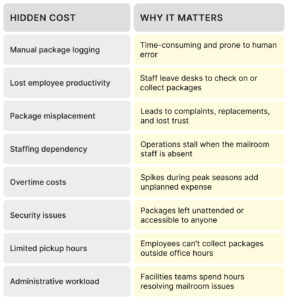
Notice how many of these aren’t about money directly. They’re about time, trust, and friction. And in a modern workplace, that friction adds up fast. A employee who spends fifteen minutes tracking down a missing package isn’t just annoyed, they’re fifteen minutes less productive. Multiply that across an organization of five hundred people and you start to see the real cost of mailroom inefficiency.
How Smart Lockers Change the Economics
This is where smart lockers enter the picture, and honestly, the shift makes sense once you look at how they operate.
Instead of a person manually receiving, logging, and distributing every parcel, a smart locker system automates the entire chain. A courier drops the package into an assigned locker. The system logs it instantly. The recipient gets a notification. They walk over, scan a code or enter a PIN, and collect it themselves.
No waiting. No dependency on staff availability. No guessing which shelf the package landed on.
This is mailroom automation in its simplest, most practical form. And it directly addresses the pain points we just covered.
Here’s the part that really catches people’s attention: smart lockers don’t require you to grow your team as delivery volume grows. The system scales without adding headcount. That alone changes the entire cost equation for a package room vs locker comparison.
Smart Lockers vs Traditional Mailrooms: The Comparison
Common mail and package receiving methods include a staffed front desk, individual mailboxes, a shared parcel room, and self-service smart lockers. Mailroom automation goes a step further, replacing manual package logging and shelving with software that scans, notifies, and tracks parcels automatically – usually paired with lockers for pickup.
Smartbox’s comparison of smart lockers versus traditional mailrooms shows automated locker-based pickup cuts staff time spent logging and holding packages while giving recipients 24/7 access instead of being limited to desk hours, a shift increasingly common in university and corporate mailrooms.
Let’s put this side by side, because seeing it laid out tends to make the decision much clearer.
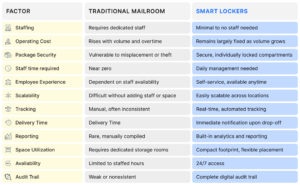
Looking at this table, the pattern is pretty clear. Traditional mailrooms depend heavily on people and manual processes. Smart lockers depend on a system that runs itself, with people only stepping in when something genuinely needs attention.
Real Life Workplace Scenarios
Numbers and tables are useful, but let’s ground this in situations facility managers actually deal with.
Scenario one: the Monday morning pile up
Every Monday, deliveries from the weekend flood in. Your mailroom staff spends the first two hours just sorting through the backlog while employees line up asking where their packages are. With smart lockers, weekend deliveries get logged and stored the moment they arrive. By Monday morning, employees already have a notification waiting, and there’s no queue to manage.
Scenario two: the hybrid work dilemma
An employee who comes in only on Tuesdays and Thursdays has a package sitting in the mailroom since Friday. By the time they collect it, it’s been unattended for four days. With smart lockers, that same package waits securely in a locker, and the employee can collect it whenever they’re actually in the office, even after hours if the building allows.
Scenario three: the vendor equipment delivery
IT teams often receive expensive equipment like laptops or networking gear. In a traditional mailroom, that equipment sits on an open shelf, sometimes for days. With a smart locker system, high value deliveries go straight into a secured compartment, and the audit trail confirms exactly who collected what and when.
Each of these situations plays out in offices every single week. And each one gets noticeably simpler once automation takes over the repetitive parts.
ROI Beyond Direct Cost Savings
It’s easy to think about ROI purely in terms of salary savings, but that undersells the real value.
Consider what improves once you shift to a digital mailroom transformation:
- Facility teams spend less time resolving package related complaints
- Employees experience shorter, more predictable pickup times
- Security incidents drop significantly due to individual locker access
- Reporting becomes instant instead of a monthly manual compilation
- Space once used for mailroom storage can be repurposed for other functions
- Employee satisfaction scores often improve, since nobody enjoys chasing down a missing parcel
There’s also a less obvious benefit. When your facilities team isn’t buried in mailroom firefighting, they have bandwidth for higher value work like space planning, vendor management, or workplace experience initiatives. That’s real ROI, even if it doesn’t show up as a single line item in a spreadsheet.
When Should Businesses Switch?
Not every organization needs to make this change immediately, and that’s a fair point to raise. If you’re a small office receiving five packages a week, a traditional mailroom might still make sense.
But if any of these sound like your situation, it’s worth taking a serious look at smart lockers:
- Your package volume has grown noticeably over the past year or two
- You’ve had complaints about missing or delayed packages
- Your mailroom staffing cost keeps climbing due to overtime or additional hires
- You support hybrid or flexible work schedules
- Your facilities team spends significant time managing mailroom issues
- You’re expanding across multiple locations and want consistent processes
If two or more of these apply, the math starts to favor automation pretty quickly.
How Smartbox Fits Into This Picture
This is where solutions like Smartbox come in. Smartbox builds smart locker systems designed specifically for the kind of package chaos we’ve been talking about, whether it’s a corporate workplace, a residential community, or a logistics heavy environment.
Instead of relying on a person to manage every drop off and pickup, Smartbox enables self-service package collection, so employees or residents can pick up their deliveries whenever it suits them. Every package is stored in a secure, individually locked compartment rather than sitting exposed on an open shelf.
The moment a package arrives, an automated notification goes out, removing the guesswork around delivery timing. Every action gets recorded in a clear audit trail, so if a question ever comes up about who collected what and when, the answer is right there.
Because the entire process runs on real time tracking, facility teams get visibility they simply don’t have with a manual system. And since the system requires minimal staff involvement, teams aren’t stuck hiring more people just to keep up with rising delivery volumes.
For organizations managing multiple sites, Smartbox supports scalable deployment, meaning the same consistent experience can roll out across locations without reinventing the process each time. And with built-in analytics and reporting, facility managers finally get the kind of data that helps with planning, not just historical record keeping.
None of this is about replacing your team. It’s about freeing them from repetitive tasks so they can focus on things that actually need human judgment.
Final Thoughts
The traditional mailroom served its purpose for a long time, and there’s nothing wrong with acknowledging that. But workplaces have changed, delivery volumes have grown, and employee expectations around convenience have shifted along with them.
When you actually total up the traditional mailroom cost, including the hidden expenses most organizations overlook, the numbers tell a pretty compelling story. Smart lockers aren’t just a trendy upgrade. They address real operational pain points around staffing, security, scalability, and employee experience.
If your organization is still relying on manual processes to manage a growing volume of packages, it might be worth asking yourself a simple question. Are you solving the problem, or just managing around it?