


Imagine an employee starting a new role on Monday morning.
Their account has already been created. Their access permissions are ready. Their applications have been provisioned. Their onboarding tasks are moving through the right workflows.
Then comes one simple question: Where is my laptop?
This is where many highly automated IT environments still rely on a surprisingly manual process.
Someone needs to find the right device, prepare it, arrange a handover, coordinate a pickup time, update the asset record, and make sure the employee receives it securely. The digital side of the process may take only minutes, but the physical handover can still slow everything down.
This is the often-overlooked last mile of IT service delivery.
As organisations continue investing in IT asset automation, self-service support, automated provisioning, and digital workflows, physical device distribution is becoming an important part of the conversation. Smart lockers offer one way to connect the automated digital workflow with the physical equipment employees actually need.
IT Automation Does Not End With a Workflow
IT teams have made significant progress in automating everyday processes.
Employees can submit requests through service portals. Software can be provisioned automatically. Devices can be configured remotely. Asset management platforms can track equipment. IT service management systems can route requests and trigger workflows.
But a workflow can only go so far.
At some point, an employee may need to physically receive a laptop, monitor, mobile device, headset, or other piece of equipment.
That physical step often brings people back into the process.
An IT technician may need to locate the device. Another person may need to hand it over. The employee may need to visit the IT desk during working hours. Asset records may need to be updated manually after the exchange.
None of these tasks are particularly complex. But when they happen hundreds or thousands of times across an organisation, they can create a significant operational burden.
This is where IT asset automation can extend beyond software and workflows into physical fulfilment.
What Is the Last Mile of IT Service Delivery?
In logistics, the last mile is the final stage between a distribution point and the person receiving a delivery.
IT has a similar challenge.
A device may have already been purchased, recorded in the asset management system, configured, secured, and assigned to an employee. Yet it still needs to get from an IT storage location into that employee’s hands.
That final step is the physical last mile.
For a single employee, it may seem insignificant. For a large organisation with multiple offices, campuses, hybrid workers, or distributed teams, it can become a recurring operational challenge.
The question then becomes:
How can organisations make physical IT fulfilment as simple as the digital processes that happen before it?
Why Physical Device Distribution Can Become a Bottleneck
Consider a standard laptop replacement.
An employee reports that their device is no longer working properly. IT reviews the request and determines that a replacement is needed.
The IT team now has to:
- Identify an available replacement device.
- Prepare and configure it.
- Record the relevant asset information.
- Contact the employee.
- Arrange a collection or delivery.
- Complete the asset exchange.
- Receive the old device if it needs to be returned.
Every individual step may be manageable. The challenge is the coordination involved.
The same pattern appears across new employee onboarding, loaner equipment, repairs, upgrades, and offboarding.
When device volumes increase, manual coordination becomes harder to scale.
This is why automated device distribution is becoming a natural extension of IT asset management automation.
How Smart Lockers Help Automate Device Distribution
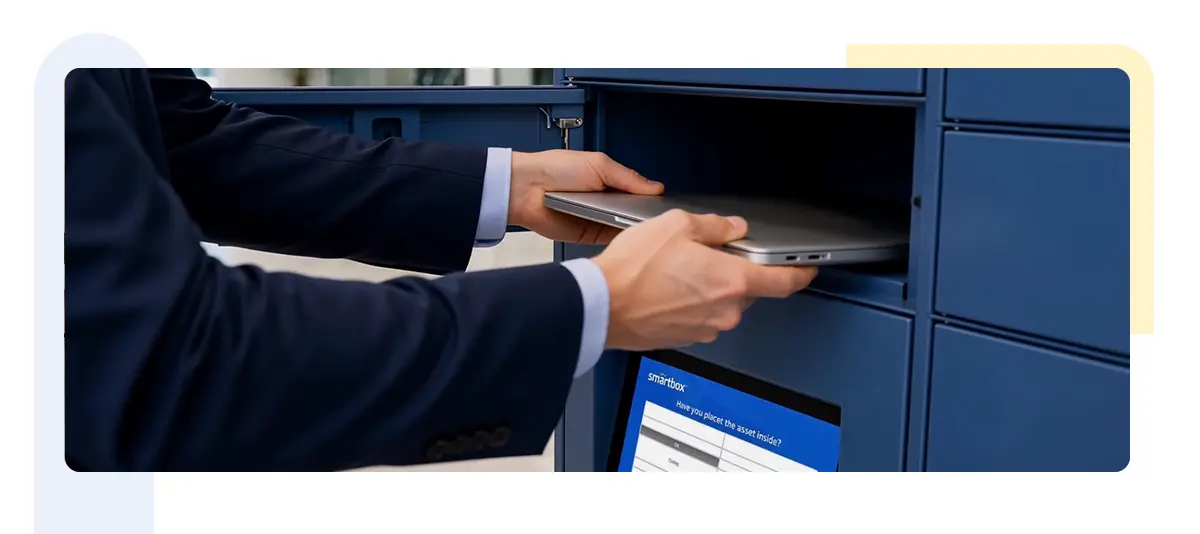
Smart lockers introduce a secure, self-service point for employees to collect or return IT equipment.
Instead of requiring an employee to coordinate directly with an IT technician, a device can be placed in an assigned locker compartment and connected to the relevant workflow.
The employee receives instructions or an access notification. They visit the locker when convenient, authenticate themselves, and collect the device.
The process can work in reverse as well.
When an employee needs to return equipment, the locker can provide a secure location for the device to be deposited. The return can then be connected to the organisation’s asset management and IT service processes.
The locker is not replacing the IT system. It is giving the system a physical endpoint.
From IT Request to Device Collection
A more connected process could look something like this:
Step 1: An employee raises a request
The employee needs a replacement laptop, loaner device, or another piece of equipment.
Step 2: IT reviews the request
The request is approved based on organisational policies and the employee’s requirements.
Step 3: Inventory is checked
The organisation identifies an available device that meets the required specifications.
Step 4: The device is prepared
The laptop or device is configured, provisioned, and associated with the appropriate asset information.
Step 5: The device is placed in a smart locker
The employee receives secure access to the assigned compartment.
Step 6: The employee collects the device
They can collect it without waiting for an IT technician or coordinating a face-to-face handover.
Step 7: The asset record is updated
The collection and asset movement can be connected to the organisation’s existing systems and processes.
The result is a much simpler experience for everyone involved.
Where IT Asset Automation Can Make the Biggest Difference
Smart lockers can support several points across the employee device lifecycle.
New Employee Onboarding
New employees often need several pieces of equipment before they can get started.
Instead of scheduling an individual handover, IT teams can prepare devices in advance and make them available through a secure locker.
This can be particularly useful when employees start outside traditional office hours or when IT teams support multiple locations.
Device Replacement
A damaged or failing laptop can disrupt an employee’s workday.
With a connected process, IT can prepare a replacement device and make it available for collection without requiring the employee to wait for a technician.
The old device can also be returned through the same type of self-service process.
Loaner Devices
Loaner equipment is frequently moved between employees.
A smart locker can provide a central and controlled location where employees can collect available loaner devices and return them when they are finished.
This can make loaner inventory easier to manage while reducing unnecessary IT desk interactions.
Repairs and Device Swaps
When a device needs to be repaired, employees often have to coordinate with IT to drop it off and collect it later.
A locker can provide a secure handoff point for both stages.
The employee drops off the device when convenient, while IT retrieves it for repair. Once the repaired or replacement device is ready, it can be placed back into the locker for collection.
Employee Offboarding
Device recovery is an important part of the IT asset lifecycle.
Instead of relying entirely on scheduled handovers or shipping arrangements, employees can return company equipment through a designated smart locker.
This creates another controlled point for collecting devices while supporting asset tracking and recovery processes.
Connecting Smart Lockers to the IT Ecosystem
The value of a smart locker becomes much greater when it works alongside the systems an organisation already uses.
IT service management platforms can manage requests and approvals. Asset management systems can maintain device records. Identity and access systems can help control who can access equipment. Endpoint management platforms can support device configuration and security.
APIs and workflow integrations can connect these systems with the locker.
For example, an approved device request could trigger a fulfilment workflow. Inventory information could identify the appropriate device. Once the device is prepared and placed in the locker, the employee could receive a notification with secure collection instructions.
This reduces the need for IT teams to manually coordinate every individual step.
Security and Accountability Still Matter
Convenience should not come at the expense of control.
IT equipment can contain sensitive company information, making secure device handling essential.
A properly integrated smart locker process can support controlled access to equipment and provide visibility into device movements.
Organisations can define who is authorised to collect a device, when it can be accessed, and which equipment is assigned to a particular employee or request.
This creates a clearer chain of custody around physical IT assets.
For IT teams, that visibility can be especially valuable when managing large device inventories across multiple locations.
A Better Experience for Employees and IT Teams
The biggest benefit of automating the physical side of IT fulfilment is not simply reducing manual work.
It is making the entire experience easier.
Employees do not necessarily want to spend part of their day waiting at an IT desk to collect a replacement laptop. They want to get their device and get back to work.
IT teams, meanwhile, should be able to spend less time coordinating routine handovers and more time dealing with issues that require their expertise.
This creates a more self-service approach to IT equipment management without removing the people responsible for managing the process.
Completing the Zero-Touch IT Experience
Zero-touch IT is often discussed in terms of software, provisioning, configuration, and automated workflows.
But for employees, the experience is not complete until they actually have the technology they need.
A laptop can be provisioned remotely, but someone still needs to get it to the employee.
That is why physical fulfilment deserves a place in conversations about IT automation.
Smart lockers can help close this gap by providing a secure physical endpoint for automated workflows.
The result is a more connected journey:
Request → Approval → Inventory → Provisioning → Fulfilment → Collection → Asset Tracking
Each stage can be connected rather than treated as a separate manual process.
What the Future of IT Asset Management Could Look Like
The next stage of IT asset management is not necessarily about adding more tools.
It is about making the tools organisations already use work together more effectively.
Service management platforms can handle requests. Asset systems can provide visibility into equipment. Endpoint platforms can prepare devices. Automation can coordinate the workflow. Smart lockers can handle the physical exchange.
When these pieces are connected, the gap between digital IT services and physical device management becomes much smaller.
The employee does not need to know which system is handling each step behind the scenes. They simply need their device to be ready when they need it.
That is the real opportunity in automating the last mile of IT.
The goal is not to make IT less human. It is to remove the repetitive coordination that gets in the way of delivering a good employee experience.
As organisations continue to automate their IT environments, the physical movement of technology will become harder to overlook. Smart lockers provide a practical way to bring that final step into the same connected workflow, helping organisations move closer to a truly self-service and efficient digital workplace.